Enter your 14-digit reference number or 10-digit customer ID to check your IESCO (Islamabad Electric Supply Company) electricity bill. You can view the amount due, due date, units consumed, and meter details, then download or print a duplicate copy.
IESCO Bill Check
Check your bill with your 14-digit reference number or 10-digit Customer ID, on the official PITC portal.
This is not the official IESCO website. Your bill opens on the official PITC portal (bill.pitc.com.pk/iescobill). Your number is not saved on our server.
You can estimate your bill first with our IESCO Bill Calculator.
What Is an IESCO Reference Number?
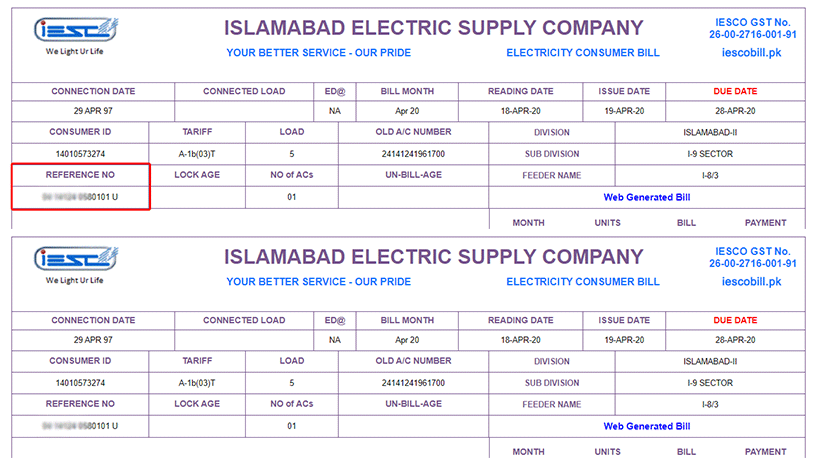
The reference number is a unique 14-digit number printed at the top of your IESCO electricity bill. It identifies your connection, stays the same every month, and is different for every consumer. You need it to check your bill online, get a duplicate copy, and register complaints, so enter it carefully.
How to Check Your IESCO Bill Online
- Enter your 14-digit reference number or 10-digit customer ID in the box at the top of this page.
- Click Check bill.
- Review your bill amount, due date, units consumed, and meter details.
- Download or print your duplicate bill if needed.
Where to Find Your Reference Number
- It is required for online bill checks and for filing complaints.
- It is printed in the top section of your electricity bill.
- It contains 14 digits.
- It does not change for the same connection.
Service Areas Under IESCO
IESCO supplies electricity to Islamabad, Rawalpindi, Attock, Jhelum, Chakwal, and selected areas of Azad Jammu & Kashmir. To find the office responsible for your connection, check the Division and Sub-Division printed on your bill.
| Circle | Covered regions |
|---|---|
| Islamabad Circle | Islamabad Capital Territory (ICT) |
| Rawalpindi Circle | Rawalpindi District and surrounding areas |
| Attock Circle | Attock District |
| Jhelum Circle | Jhelum District |
| Chakwal Circle | Chakwal District |
| AJK areas | Selected areas of Azad Jammu & Kashmir |
IESCO Peak and Off-Peak Hours
Peak hours affect your tariff, so it helps to know when they apply.
| Months | Peak hours | Off-peak hours |
|---|---|---|
| December – February | 5:00 PM – 9:00 PM | All other hours |
| March – May | 6:00 PM – 10:00 PM | All other hours |
| June – August | 7:00 PM – 11:00 PM | All other hours |
| September – November | 6:00 PM – 10:00 PM | All other hours |
Timings are subject to change by the regulator. Please confirm with IESCO’s official notifications.
How to Pay Your IESCO Bill
You can pay without standing in a queue:
- Easypaisa: Open the app, choose Bill Payment, select IESCO, enter your reference number, and confirm.
- JazzCash: Use the app or USSD service, select Electricity, choose IESCO, enter your reference number, and complete the payment.
- Mobile banking apps: Go to Utility Bills, select IESCO, enter your reference number, and pay.
- ATM: Choose Bill Payment on a supported ATM and enter the required details.
- Internet banking: Pay from home without visiting a branch.
- Bank branch: Visit an authorized branch with your bill.
- IESCO customer service centers: Visit a nearby office for payment help and other services.
Always keep your payment receipt. It is your proof of payment if a billing issue comes up later.
IESCO Complaints and Helpline
Billing complaint desk
IESCO Head Office, Street 40, Sector G-7/4, Islamabad
Helpline 051-9252937
CEO office email: ce@iesco.com.pk
SMS Complaint Service: send your reference number to 8118.
Check Bill Status and Payment History
How to Check IESCO Bill Status?
IESCO Complaints and Helpline
If you did not receive your bill, enter your reference number in the bill checker at the top of this page to view and download a duplicate copy. What is the unit rate for IESCO residential connections?
Rates depend on your consumption slab and change with official tariff updates. See our IESCO tariff page or iesco.com.pk for the latest rates.
See the full 2026 tariff.
How do I apply for a new IESCO connection?
Fill out and submit the “Application and Agreement” (A&A) form to your local IESCO office along with the required documents.
Independent information website. Not affiliated with IESCO or PITC. Learn more on our About page, or Contact us. Read our Privacy Policy and Disclaimer.
FAQs About IESCO Bill
Can I check the bill by meter number?
An IESCO consumer can check their Bill only by the 14 Digit reference number, not the Meter number.
Can I check iesco bill by name or address?
No, you can not check your IESCO bill by your name or Home address, you can only check your Bill just by the Reference Number or the Consumer ID.
How to get the previous month’s bill?
If you do not receive your IESCO bill, you can get a duplicate bill copy by clicking here.
What is the unit rate for the IESCO residential connection?
You can check the IESCO residential unit rate above here
How can I apply for a new connection?
If you want a new Iesco connection, you must fill out and submit the “Application and Agreement” form, also known as the A&A form.
Can I check the IESCO bill by ID card (CNIC) number?
In the current pattern, you can check your IESCO Bill only by the 14-digit reference number.